← /3/

Thread No.1033635

New launches split creator fees 50% to the poster and 50% to the launcher. No tripcode is needed to launch; poster claims require verified ownership.

Anonymous10/15/26(Thu)08:17:12 No.1033635
cow
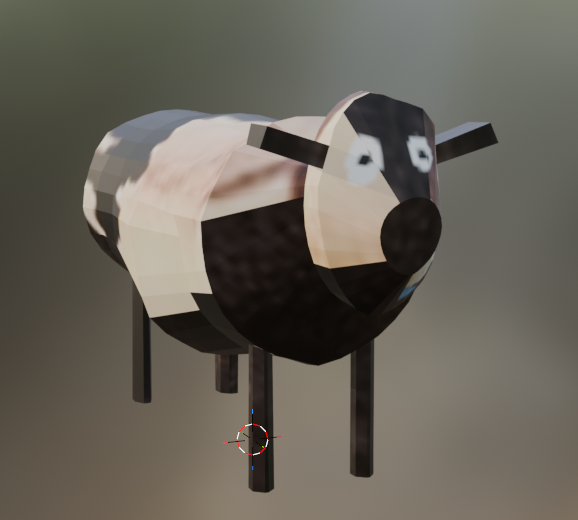
I did the donut tutorial, and then tried to make a cow.
But I am having trouble making the model itself not look like the original "basic shapes".
picrel is the cow I made, what should I do to make more "natural" shapes?
Anonymous10/15/26(Thu)11:26:50 No.1033643
For making creatures, the common flow is sculpting -> retopo. Start looking at the sculpting interface if you wanna make creatures with organic details, poly modelling is for when you want to make assets with precise control.
Anonymous10/15/26(Thu)11:28:53 No.1033644
>>1033635
Statt by getting a pic of a cow and analyzing what makes it a cow rather than, say, a sheep
Anonymous10/15/26(Thu)11:40:29 No.1033645
Why is advice here useless?
Anonymous10/15/26(Thu)11:55:58 No.1033646
>>1033645
Probably need to wait more than a couple hours before deciding that, ADHD-kun
Anonymous10/15/26(Thu)12:04:24 No.1033647
>>1033645
>>1033646
Will also help if you post more than the barest fucking minimum. There isn't a single board in the world that won't tell you, at best, than that cow is a terrible low effort piece of shit made for the sole purpose of trolling. You know very well what must be done to get more natural shapes, any vague look at a cow will tell you that.
Anonymous10/15/26(Thu)13:06:01 No.1033648
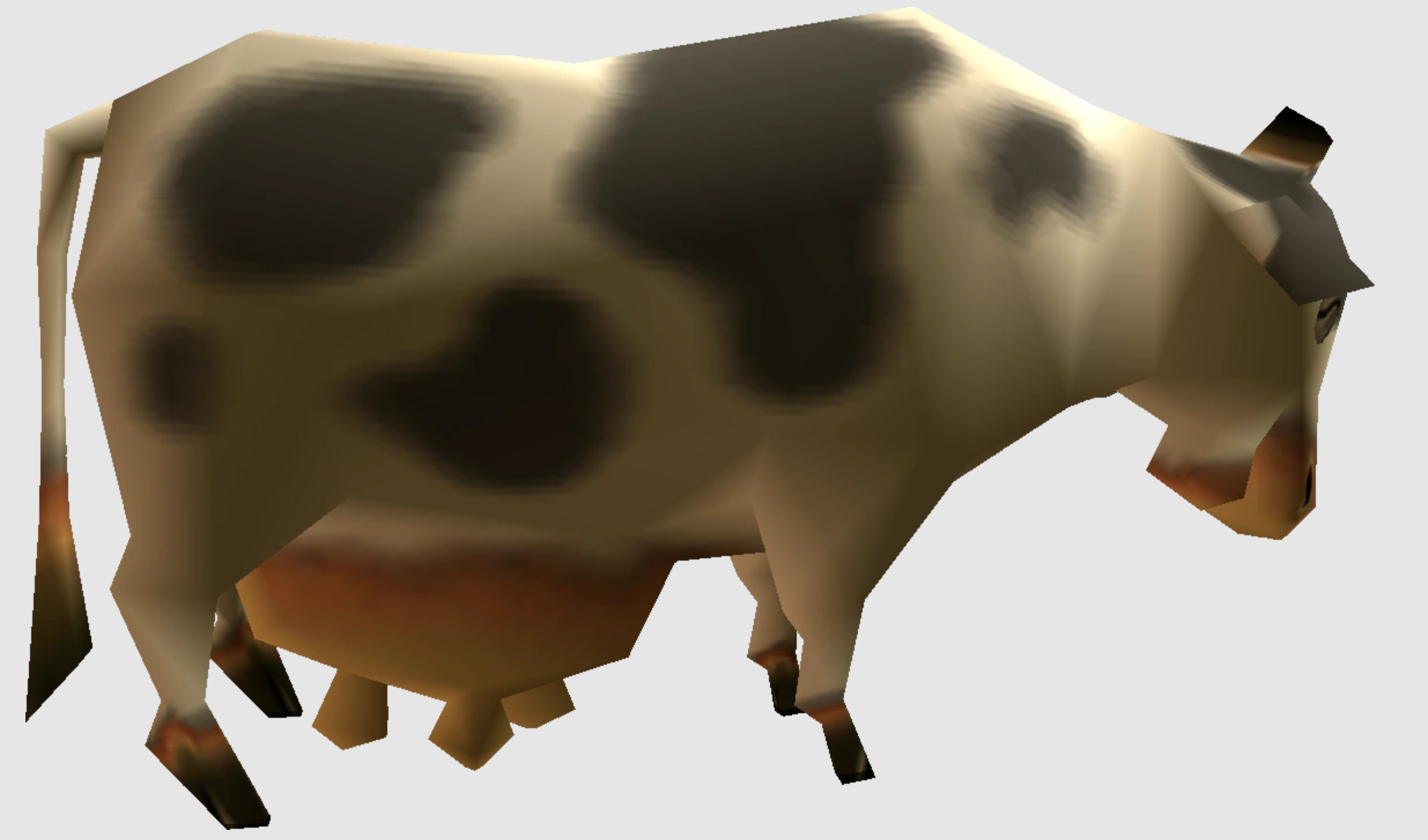
Untitled58965896
>>1033647
You know what's funny? I just had an argument in the Blender mega thread where an anon whined about wanting more RAM before making art.

I tried to tell him the amount of ram doesn't matter unless you can actually make [good] 3D art first.

Look at this 3D model of a cow from the N64. It might be low poly but it still looks a million times better than the picture in the OP.
Unfortunately, too many artists these days don't want to learn the fundamentals.
Anonymous10/15/26(Thu)14:46:47 No.1033649
>>1033648
Now that's some real good cow

Look at those nice big udders
Anonymous10/16/26(Fri)00:43:41 No.1033673
>>1033648
When you actually start rendering realistic high poly models you need ram. I don't even like what you posted
Anonymous10/16/26(Fri)00:57:42 No.1033674
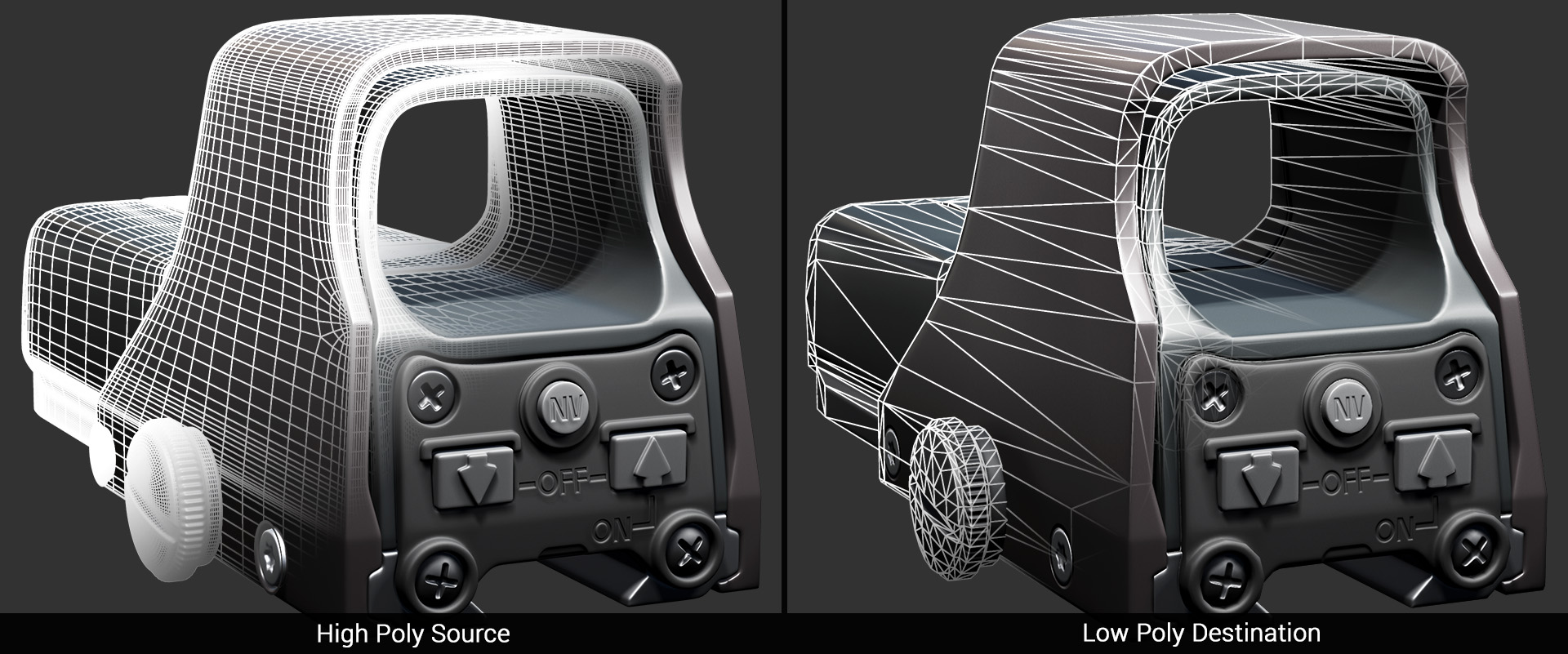
eotechhighlowb
>>1033673
There's nothing special about a high poly model that is structurally flawed.

In fact, the professional workflow is that you are meant to subdivide your base asset and bake out other details such as normal maps.

Video games do this all the time and none can tell the difference when executed well.
Anonymous10/16/26(Fri)02:48:28 No.1033677
>>1033674
NTA, but the high poly seems hugely unnecessary for something like that Eotech anyway. It has so many flat surfaces you can just go with a boolean workflow and it'll look the same even without a high poly to bake down from. There's definitely an argument to go extra high poly for more organic designs.
Anonymous10/16/26(Fri)03:37:17 No.1033679
>>1033673
That's not a ram that's a cow, man
Anonymous10/16/26(Fri)09:46:33 No.1033690
>>1033643
I see
what I did was, I made the whole model first, then tried to give it detail with the sculpting tools
maybe I was too blindsighted by the fact that I should be moving left to right on the windows in blender
I am not sure how to retopo after sculpting it, as it becomes a mess, but I'll try that next time

>>1033647
I will tell you that, this cow wasn't low effort for me
It took me my whole weekend to make this
I am sorry that my efforts did not meet your standards anon

>>1033648
I am trying my best to learn the basics anon
but I keep telling myself that everyone has to start somewhere
or I won't be able to start doing anything
Anonymous10/16/26(Fri)14:33:49 No.1033699
>>1033690
>I am trying my best to learn the basics anon but I keep telling myself that everyone has to start somewhere or I won't be able to start doing anything

If you want to learn that also means being able to handle criticism too.
Otherwise, you will never improve and also not realize the mistakes you are making.
When I made my first 3D models, I made a bunch of blocks and even I knew they were horrible looking back then.
But after 5 days I sat down and aggressively made something that at least looked passable for an N64 or PS1 video game.
But I only improved so fast because I listened to the critiques from my peers.
Anonymous10/20/26(Tue)08:25:59 No.1033830
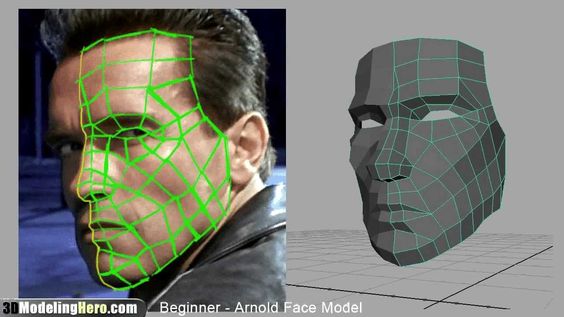
90542dd6a856963f0c5cc430f5f592a1--blender-tutorial-character-modeling
>>1033635
>>1033643
You kids and your Blender slop.
Learn the oldschool BOX MODELING.
Look up mid-2000s' 3DS Max video game character modeling tutorials.
This is one of the classics I started off with :

https://www.scribd.com/document/58244050/Low-Poly-Character-Modeling-and-Texturing-Tutorial

Get yourself reference image or two, one from the front, one from the side. Make sure they're in same scale and that the details align horizontally.
Then start extruding the reference images' silhouette out of a literal cube, starting from the feet.

Subdivide or cut-in new edges only when needed. Try to keep the edge-flow in mind and simplify things when not needed.
You can model limbs and heads separately and then add a few edge-loops where the bodypart should connect to the torso, then "weld" them shut. Having 2-3 extra loops near the joints helps with animation as well.
Anonymous10/20/26(Tue)09:07:29 No.1033831
>>1033635
Learn a bit about "edgeflow".
Edgeflow is for more than just shading and doformation. When you really grasp it, you'll begin to feel out the shapes of things too. The edges will contour along the shape.

Also, look for the "smooth vertices". Smoothing will help get rid of the primitive shape look. And you can use the sculpting tools as well, even on low polygon models. Sculpting won't add or subtract any polygons unless you enable it to. By default, those tools only help you push vertices around.
Anonymous10/25/26(Sun)17:11:47 No.1033979
>>1033643
Ive been attempting to learn blender for far too long to be as shit as i am. I did what you suggest here for a generic monster and ive got some major issues that i cannot figure out.
>sculpting
>brush over area
>so of it works, some parts behave as if there is a mask
>???
>uv
>randomly throws parts into different islands with seemingly no consistent behaviour
>texturing
>ucupaint red line
>red dots appear in random places all over the model
>can't figure out if its related to uv issues or not
I hate blender
Anonymous10/26/26(Mon)02:10:58 No.1033995
>>1033979
Post pics or it's just a fanfic
Anonymous10/26/26(Mon)11:33:26 No.1034008
>>1033635
brah. blender guru is washed. do grant abbitt's tutorials instead
Anonymous10/26/26(Mon)12:03:47 No.1034009
>>1033995
So. I went to record it happening, but i had saved after i decimated everything and its no longer happening.
However, all my materials are applying to the entire thing now, so there's that. I genuinely might just start making something else to see if I've somehow learned something that i didn't in the past couple years